c.【华为设备mstp+vrrp 配置】
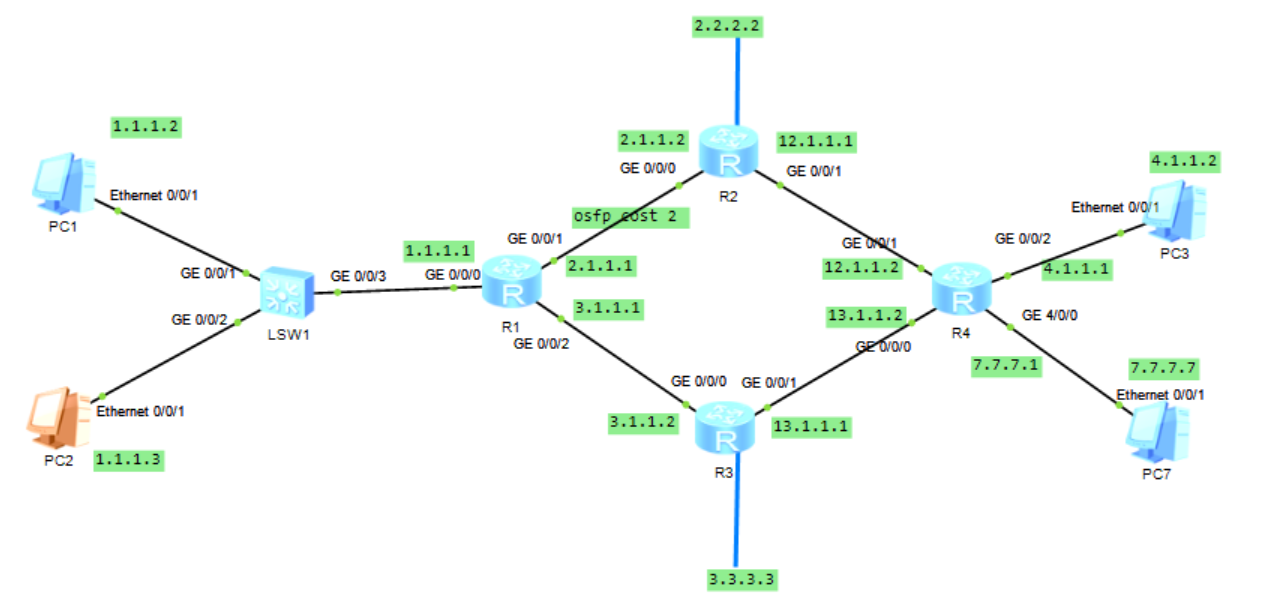
R1配置
<R1>dis ip int b
Interface                         IP Address/Mask      Physical   Protocol
GigabitEthernet0/0/0              1.1.1.1/24           up         up
GigabitEthernet0/0/1              2.1.1.1/24           up         up
GigabitEthernet0/0/2              3.1.1.1/24           up         up

[R1-ospf-1-area-0.0.0.0]dis this
 area 0.0.0.0
  network 1.1.1.1 0.0.0.0
  network 2.1.1.1 0.0.0.0
  network 3.1.1.1 0.0.0.0

<R1>dis ip routing-table
        1.1.1.0/24  Direct  0    0           D   1.1.1.1
        1.1.1.1/32  Direct  0    0           D   127.0.0.1
      1.1.1.255/32  Direct  0    0           D   127.0.0.1
        2.1.1.0/24  Direct  0    0           D   2.1.1.1
        2.1.1.1/32  Direct  0    0           D   127.0.0.1
      2.1.1.255/32  Direct  0    0           D   127.0.0.1
        2.2.2.2/32  OSPF    10   2           D   2.1.1.2
        3.1.1.0/24  Direct  0    0           D   3.1.1.1
        3.1.1.1/32  Direct  0    0           D   127.0.0.1
      3.1.1.255/32  Direct  0    0           D   127.0.0.1
        3.3.3.3/32  OSPF    10   1           D   3.1.1.2
        4.1.1.0/24  OSPF    10   3           D   3.1.1.2
       12.1.1.0/24  OSPF    10   3           D   2.1.1.2
                    OSPF    10   3           D   3.1.1.2
       13.1.1.0/24  OSPF    10   2           D   3.1.1.2
R2配置
[r2]dis ip int b
Interface                         IP Address/Mask      Physical   Protocol
GigabitEthernet0/0/0              2.1.1.2/24           up         up
GigabitEthernet0/0/1              12.1.1.1/24          up         up
LoopBack1                         2.2.2.2/24           up         up(s)

[r2-ospf-1-area-0.0.0.0]dis this
 area 0.0.0.0
  network 2.1.1.2 0.0.0.0
  network 2.2.2.2 0.0.0.0
  network 12.1.1.1 0.0.0.0
R3配置
<r3>dis ip int b
Interface                         IP Address/Mask      Physical   Protocol
GigabitEthernet0/0/0              3.1.1.2/24           up         up
GigabitEthernet0/0/1              13.1.1.1/24          up         up
LoopBack0                         3.3.3.3/24           up         up(s)

ospf 1 router-id 3.3.3.3
 area 0.0.0.0
  network 3.1.1.2 0.0.0.0
  network 3.3.3.3 0.0.0.0
  network 13.1.1.1 0.0.0.0
R4 配置
[r4]ospf 1
[r4-ospf-1]dis this
ospf 1 router-id 4.4.4.4
 area 0.0.0.0
  network 4.1.1.1 0.0.0.0
  network 12.1.1.2 0.0.0.0
  network 13.1.1.2 0.0.0.0

[r4]dis ip int b
Interface                         IP Address/Mask      Physical   Protocol
GigabitEthernet0/0/0              13.1.1.2/24          up         up
GigabitEthernet0/0/1              12.1.1.2/24          up         up
GigabitEthernet0/0/2              4.1.1.1/24           up         up
查看接口的ospf cost 值
<R1>display ospf brief
  OSPF Process 1 with Router ID 1.1.1.1
   OSPF Protocol Information
 RouterID: 1.1.1.1          Border Router:
 Multi-VPN-Instance is not enabled
 Global DS-TE Mode: Non-Standard IETF Mode
 Graceful-restart capability: disabled
 Helper support capability  : not configured
 Applications Supported: MPLS Traffic-Engineering
 Spf-schedule-interval: max 10000ms, start 500ms, hold 1000ms
 Default ASE parameters: Metric: 1 Tag: 1 Type: 2
 Route Preference: 10
 ASE Route Preference: 150
 SPF Computation Count: 23
 RFC 1583 Compatible
 Retransmission limitation is disabled
 Area Count: 1   Nssa Area Count: 0
 ExChange/Loading Neighbors: 0
 Process total up interface count: 3
 Process valid up interface count: 3

 Area: 0.0.0.0          (MPLS TE not enabled)
 Authtype: None   Area flag: Normal
 SPF scheduled Count: 23
 ExChange/Loading Neighbors: 0
 Router ID conflict state: Normal
 Area interface up count: 3

### 默认cost 值为1
 Interface: 1.1.1.1 (GigabitEthernet0/0/0)
 Cost: 1       State: DR        Type: Broadcast    MTU: 1500
 Priority: 1
 Designated Router: 1.1.1.1
 Backup Designated Router: 0.0.0.0
 Timers: Hello 10 , Dead 40 , Poll  120 , Retransmit 5 , Transmit Delay 1
### 默认cost 值为1
 Interface: 2.1.1.1 (GigabitEthernet0/0/1)
 Cost: 1       State: DR        Type: Broadcast    MTU: 1500
 Priority: 1
 Designated Router: 2.1.1.1
 Backup Designated Router: 2.1.1.2
 Timers: Hello 10 , Dead 40 , Poll  120 , Retransmit 5 , Transmit Delay 1
### 默认cost 值为1
 Interface: 3.1.1.1 (GigabitEthernet0/0/2)
 Cost: 1       State: DR        Type: Broadcast    MTU: 1500
 Priority: 1
 Designated Router: 3.1.1.1
 Backup Designated Router: 3.1.1.2
 Timers: Hello 10 , Dead 40 , Poll  120 , Retransmit 5 , Transmit Delay 1
<R1>
PC2 客户端tracert 4.1.1.2
PC>tracert 4.1.1.2
traceroute to 4.1.1.2, 8 hops max
(ICMP), press Ctrl+C to stop
 1  1.1.1.1   46 ms  47 ms  47 ms
 2  2.1.1.2   47 ms  31 ms  47 ms
 3  12.1.1.2   47 ms  47 ms  47 ms
 4    *4.1.1.2   62 ms  47 ms
[R1]int GigabitEthernet 0/0/1
[R1-GigabitEthernet0/0/1]ospf c
[R1-GigabitEthernet0/0/1]ospf cost 2


 Interface: 2.1.1.1 (GigabitEthernet0/0/1)
 Cost: 2       State: DR        Type: Broadcast    MTU: 1500
 Priority: 1
 Designated Router: 2.1.1.1
 Backup Designated Router: 2.1.1.2
 Timers: Hello 10 , Dead 40 , Poll  120 , Retransmit 5 , Transmit Delay 1
PC2 客户端再tracert 4.1.1.2
PC>tracert 4.1.1.2

traceroute to 4.1.1.2, 8 hops max
(ICMP), press Ctrl+C to stop
 1  1.1.1.1   16 ms  47 ms  47 ms
 2  3.1.1.2   46 ms  47 ms  32 ms
 3  13.1.1.2   78 ms  62 ms  47 ms
 4  4.1.1.2   63 ms  46 ms  47 ms
这里可以tracert看到从13.1.1.2走
需求1.1.1.0/24网段不能访问7.7.7.7(过滤7.7.7.0/24不能被1.1.1.0/24访问)
R1上配置acl
[R1-acl-basic-2000]dis this
acl number 2000
 rule 10 deny source 7.7.7.0 0.0.0.255
 rule 15 permit
[R1-acl-basic-2000]ospf 1
[R1-ospf-1]filter-policy 2000 import

###查看配置情况
[R1-ospf-1]dis this
ospf 1 router-id 1.1.1.1
 filter-policy 2000 import
 area 0.0.0.0
  network 1.1.1.1 0.0.0.0
  network 2.1.1.1 0.0.0.0
  network 3.1.1.1 0.0.0.0
策略路由配置---本地方式:只能对由本机主动触发的流量生 效。对流经本机的(转发流量)无效。
再没有配置 policy-based-route 下tracert
<R1>tracert 4.1.1.2
 traceroute to  4.1.1.2(4.1.1.2), max hops: 30 ,packet length: 40,press CTRL_C to break
 1 3.1.1.2 40 ms  20 ms  20 ms
 2 13.1.1.2 20 ms  20 ms  20 ms
 3  * 4.1.1.2 30 ms  20 ms
R1上配置
[R1]acl number 3000
rule 5 permit ip destination 4.1.1.2 0

[R1]policy-based-route aa permit node 10
if-match acl 3000
apply ip-address next-hop 2.1.1.2   (强制下一跳)
[R1]ip local policy-based-route aa  本地调用
配置之后 policy-based-route
[R1]tracert 4.1.1.2
 traceroute to  4.1.1.2(4.1.1.2), max hops: 30 ,packet length: 40,press CTRL_C to break
 1 2.1.1.2 30 ms  10 ms  20 ms
 2 12.1.1.2 20 ms  20 ms  20 ms
 3 4.1.1.2 30 ms  20 ms  20 ms
注意客户端上转发的路由还是走13.1.1.2
PC>tracert 7.7.7.7
traceroute to 7.7.7.7, 8 hops max
 1  1.1.1.1   47 ms  31 ms  47 ms
 2  3.1.1.2   47 ms  47 ms  46 ms
 3  13.1.1.2   32 ms  78 ms  31 ms
 4    *7.7.7.7   63 ms  46 ms
查看配置信息
<R1>dis policy-based-route
 policy-based-route : aa
  Node  10  permit :
    if-match acl 3000
    apply
 ip-address next-hop 2.1.1.2
1)#分类
acl number 2001
 rule 5 permit source 1.1.1.2 0
acl number 2002
 rule 5 permit source 1.1.1.3 0
#
traffic classifier vlan2 operator or
 if-match acl 2001
traffic classifier vlan3 operator or
 if-match acl 2002
2)动作
traffic behavior vlan
 redirect ip-nexthop 2.1.1.2
traffic behavior vlan2
 redirect ip-nexthop 3.1.1.2
traffic behavior vlan3
3)关连
traffic policy bb
 classifier vlan2 behavior vlan2
 classifier vlan3 behavior vlan3
4)调用
interface GigabitEthernet0/0/0
 ip address 1.1.1.1 255.255.255.0
 traffic-policy bb inbound
[R4-GigabitEthernet4/0/0]dis this
[V200R003C00]
#
interface GigabitEthernet4/0/0
 ip address 20.1.1.1 255.255.255.0
 traffic-filter outbound acl name fengbu2
#
return
[R4-GigabitEthernet4/0/0]
[R4-GigabitEthernet4/0/0]•dis acl all
 Total quantity of nonempty ACL number is 1

Advanced ACL fengbu2 3002, 1 rule
Acl's step is 5
 rule 5 deny ip source 10.2.1.0 0.0.0.255 destination 20.1.1.0 0.0.0.255 (13 mat
ches)
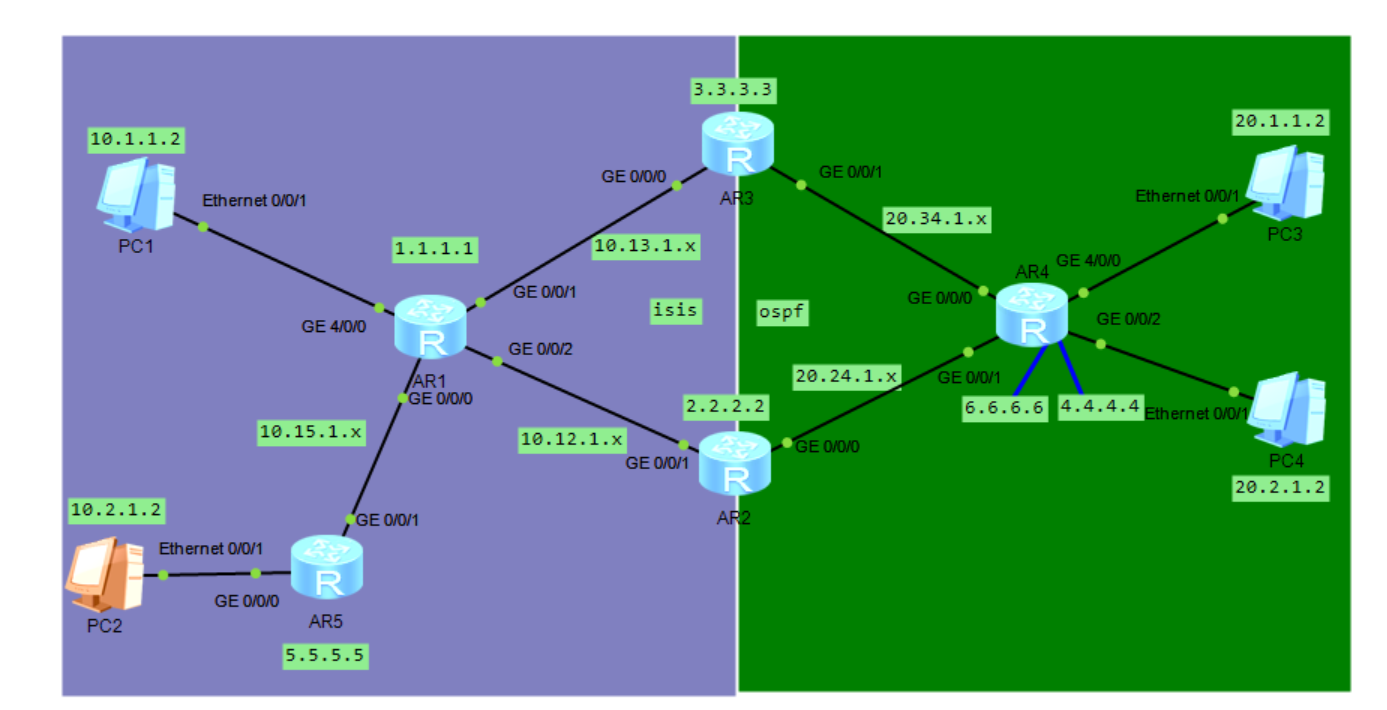
5.1 双路由引入防环
R2/R3
双路由引入
isis 1
 cost-style wide
 network-entity 49.0001.0000.0000.0003.00
 import-route ospf 1 route-policy O_I    ## 引入时符加路由策略
 preference route-policy cost_ospf

ospf 1
 import-route isis 1 route-policy I_O    ## 引入时符加路由策略
 area 0.0.0.0
  network 3.3.3.3 0.0.0.0
  network 20.34.1.0 0.0.0.255
路由策略
route-policy O_I deny node 10
 if-match tag 110
#
route-policy O_I permit node 20
 apply tag 150
#
route-policy I_O deny node 10
 if-match tag 150
#
route-policy I_O permit node 20
 apply tag 110
5.2 解决到达6.6.6.6的次优路径
R2/R2
双路由引入
isis 1
 cost-style wide
 network-entity 49.0001.0000.0000.0003.00
 import-route ospf 1 route-policy O_I    ## 引入时符加路由策略
 preference route-policy cost_ospf       ## 修改优先级
[R3-isis-1]dis this
isis 1
 cost-style wide
 network-entity 49.0001.0000.0000.0003.00
 import-route ospf 1 route-policy O_I
 preference route-policy cost_ospf
-------------------------------------------------------
route-policy cost_ospf permit node 10
 if-match tag 150
 apply preference 170
route-policy cost_ospf permit node 20
 泡杯长岛冰茶
11763
泡杯长岛冰茶
8295
泡杯长岛冰茶
11763
泡杯长岛冰茶
8295
 云贝教育
5897
云贝教育
5897
 AskGuo
5794
AskGuo
5794
 1菩提行者1
5119
云贝教育
5076
1菩提行者1
5119
云贝教育
5076

 19941464235
 junle.chen@yunbee.net
 QQ群咨询:1080888483






点击加载更多