系统版本
[root@tidb01 ~]# cat /etc/redhat-release
CentOS Linux release 7.9.2009 (Core)
[root@tidb01 ~]# uname -a
Linux tidb01 3.10.0-1160.el7.x86_64 #1 SMP Mon Oct 19 16:18:59 UTC 2020 x86_64 x86_64 x86_64 GNU/Linux
系统IP地址
cat <<END>> /etc/hosts
172.16.20.30 tidb0
172.16.20.31 tidb01
172.16.20.32 tidb02
172.16.20.33 tidb03
172.16.20.34 tidb04
172.16.20.35 tidb05
172.16.20.36 tidb06
END
1.-下载TIUP工具
curl --proto '=https' --tlsv1.2 -sSf https://tiup-mirrors.pingcap.com/install.sh |sh
2.-加载环境变量
source /root/.bash_profile
3.-安装cluster组件
[root@tidb01 ~]# tiup cluster
4.-更新组件至最新版本
[root@tidb01 ~]# tiup update --self && tiup update cluster
5.-查看当前的一个TiUP-cluster 的版本
[root@tidb01 ~]# tiup --binary cluster
/root/.tiup/components/cluster/v1.11.1/tiup-cluster
6.-生成一个模板文件
tiup cluster template > topology.yaml
[root@tidb01 ~]# egrep -v "#|^$" topology.yaml  >topology01.yaml
global:
  user: "tidb"
  ssh_port: 22
  deploy_dir: "/tidb-deploy"
  data_dir: "/tidb-data"
  arch: "amd64"
monitored:
  node_exporter_port: 9100
  blackbox_exporter_port: 9115
pd_servers:
  - host: 172.16.20.31
  - host: 172.16.20.32
  - host: 172.16.20.33
tidb_servers:
  - host: 172.16.20.34
#  - host: 172.16.20.30
tikv_servers:
  - host: 172.16.20.35
  - host: 172.16.20.36
  - host: 172.16.20.37
tiflash_servers:
#  - host: 172.16.20.20
#  - host: 172.16.20.21
monitoring_servers:
  - host: 172.16.20.30
grafana_servers:
  - host: 172.16.20.30
alertmanager_servers:
  - host: 172.16.20.30

--------------检查节点是否满足安装条件-------------------------
[root@tidb01 ~]# tiup cluster check ./topology01.yaml  --apply --user root -p

--------------安装TiDB数据库--------------------------------
tiup cluster deploy mytest v5.0.0  ./topology01.yaml --user root -p
--------------查看集群的状态--------------------------------
tiup cluster display mytest
--------------启动集群的状态--------------------------------
tiup cluster start mytest --init
#连接测试
mysql -h172.16.20.34 -uroot -P 4000 -p'i02!_31A4L6W=$Nfrv'
其它mysql 客户端工具
Mycli(https://www.mycli.net/)
mysql Workbench 、Navicat、phpMyAdmin
客户端连接接口支持
常用的mysql接口都支持
[root@tidb01 ~]# tiup cluster stop mytest
[root@tidb01 ~]# tiup cluster start mytest
mysql -h172.16.20.34 -uroot -P 4000 -p'i02!_31A4L6W=$Nfrv'

#查看 TIDB数据库的版本
select tidb_version();


MySQL [(none)]> create database tidb;

MySQL [(none)]> use tidb;

MySQL [tidb]> create table t1 (id int(11),name varchar(20));

MySQL [tidb]> insert into t1 values(35,'zhangzhen');

MySQL [tidb]> select * from t1;
+------+-----------+
| id   | name      |
+------+-----------+
|   35 | zhangzhen |
+------+-----------+
1 row in set (0.00 sec)
MySQL [tidb]> show processlit;
ERROR 1064 (42000): You have an error in your SQL syntax; check the manual that corresponds to your TiDB version for the right syntax to use line 1 column 15 near "processlit"
MySQL [tidb]> show processlist;
+------+------+--------------------+------+---------+------+------------+------------------+
| Id   | User | Host               | db   | Command | Time | State      | Info             |
+------+------+--------------------+------+---------+------+------------+------------------+
|   11 | root | 172.16.20.31:53716 | tidb | Query   |    0 | autocommit | show processlist |

#ID: 连接的ID,每个连接不同。
#USER:连接的用户名。
#host:连接的客户端主机名。
#db  :当前连接的数据库
#Command: 连接用户当前命令动作,Qurey代表查询,Sleep表示没有任何操作。
#Time:  连接时长。
#State: 连接的提交状态。
#info: 命令信息,一般为正在执行的命令,NULL代表没有执行任何命令。

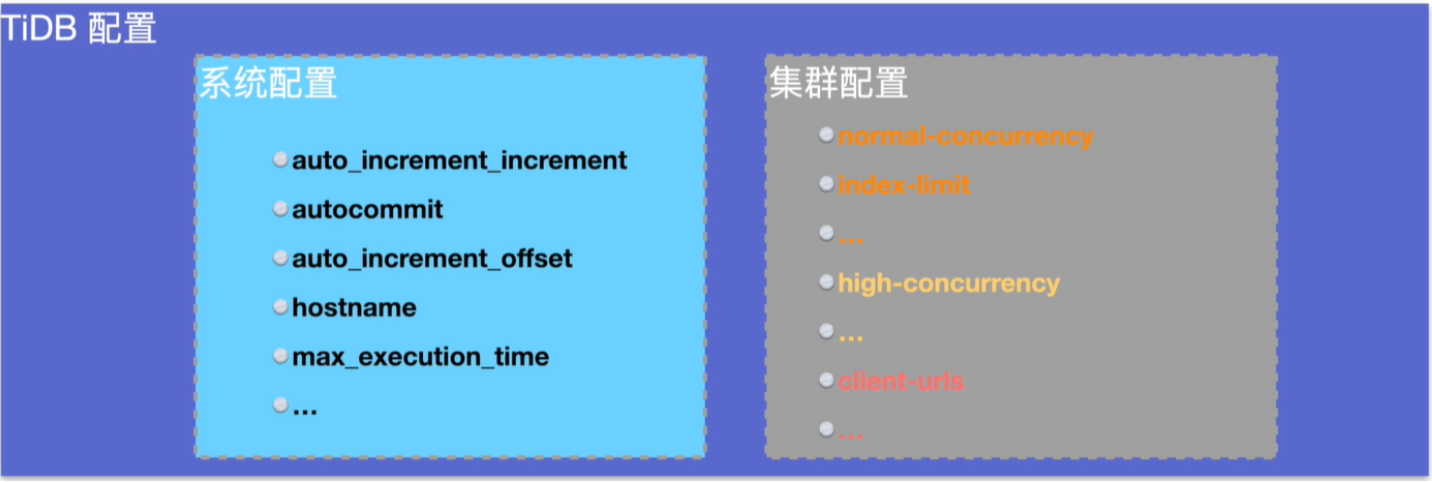
系统配置:不包括pd,与TIKV ,TIDB一部分参数存储在KV中 、TIDB-Server的参数不包含在KV中,持久化到数据库层面。
集群配置:包括TIKV ,TIDB、PD、TIKV、TiFlash配置文件中,重启生效,通过tiup edit-config与reload进行修改。
修改示例
global作用域参数修改:
set @@global.tidb_dissql_scan_concurrency=10;
set GLOBAL tidb_distsql_scan_concurrency= 10;
session 作用域数据修改:
set tidb_distsql_scan_concurrency = 10;
set session tidb_distsql_scan_concurrency = 10;
集群参数的修改
#第一步:以编辑模式打开该集群的配置文件
tiup cluster edit-config clus-name
#第二步:设置参数
tidb_servers:
- host: 10.0.1.20
  port: 4000
  config:
      log.slow-threshold:300
#第三步:执行reload命令滚动分发配置、重启相应组件:
tiup cluster reload ${cluster-name} [-N <nodes>] [-R <roles>]
#查看修改
show config
当前会话配置
MySQL [test]> set auto_increment_increment = 10          ##设置当前session配置
MySQL [test]> set global auto_increment_increment = 10   ##设置当前session配置
注意: global 只会影响新的会话,不会更变老的会话。
example
mysql -h172.16.20.34 -uroot -P 4000 -p'i02!_31A4L6W=$Nfrv';
use test;
create table t1 (a int not null primary key auto_increment);
MySQL [test]> insert into t1 values();
MySQL [test]> insert into t1 values();
MySQL [test]> set auto_increment_increment = 10     ##设置当前session配置
MySQL [test]> insert into t1 values();
MySQL [test]> select * from t1;
+----+
| a  |
+----+
|  1 |
|  2 |
| 11 |
+----+
MySQL [test]> show variables like '%increment_increment%';
+--------------------------+-------+
| Variable_name            | Value |
+--------------------------+-------+
| auto_increment_increment | 10    |
+--------------------------+-------+
使用tiup config与tiup reload,修改所有的TIKV节点的配置,log-level的级别为warning。
#配置文件目录 /tidb-deploy/tikv-20160/conf/tikv.toml
tiup cluster edit-config mytest
global:
  user: tidb
  ssh_port: 22
  ssh_type: builtin
  deploy_dir: /tidb-deploy
  data_dir: /tidb-data
  os: linux
  arch: amd64
----------------------新加的内容-----------------------
server_configs:
 tidb: {}
 tikv:
  log-level: warning
#加载修改的配置,注意此步骤不会影响生产,只会对性能有一定的影响。
tiup cluster reload mytest
#查看是否修改成功
[root@tidb05 /tidb-deploy/tikv-20160/conf]# cat /tidb-deploy/tikv-20160/conf/tikv.toml
log-level = "warning"
认证(authentication):对用户进行验证
 1.是权限控制的第一步
 2.当用户第一次连接数据库时必须进行认证(authencation)
 3.如果认证失败则无法连接数据库
授权(authorization):对用户的权限进行验证
 1.这个是权限控制的第二步
 2.TiDB将会决定用户是否有权限进行他想做的操作。

角色定义
 角色是权限的集合:
 1.能够像单个用户一个被赋予权限
 2.能够包含其他角色
角色与用户的相似之处:
 1.被存储在mysql.users表中
 2.角色名和用户名一样都包含名称和主机
查看与创建用户信息
MySQL [mysql]> select user,host,authentication_string from mysql.user;
+------+------+-------------------------------------------+
| user | host | authentication_string                     |
+------+------+-------------------------------------------+
| root | %    | *3882C8EE73A7E53A9ADD43571E7C3337BD2B4667 |
+------+------+-------------------------------------------+
#创建一个用户zz在允许在172.16.20.0这个网段上连接数据库
create user 'zz'@'172.16.20.%' identified by '1234';     #敏感大小写
创建一个角色
create role 'r_admin','r_dev'@'localhost';
set role all 命令开启用户被赋予的角色 。
1.赋予zz用户读取test数据库所有表的权限,切可以打权限传递给他人。
grant read on 'test'.* to 'zz'@'172.16.20.%' with grant option;
2.赋予用户全部权限:
grant all privileges on '*' to 'zz'@'172.16.20.%' with grant option;
3.回收用户所有权限:
revoke all privileges on *.* from 'zz'@'172.16.20.%';
4.查看用户权限;
show grants for 'admin'@'localhost';
5.删除用户;
MySQL [mysql]> drop user 'zz@127.0.0.1';
1.赋予角色权限
grant select on 'test.*' to 'r_dev'@'localhost';
2.将角色授予用户
grant 'r_admin' to 'zz'@'172.16.20.%';
3.查看角色拥有的权限
show grants for 'dev1'@'localhost'
4.回收角色权限;
revoke insert,update,delete on 'test.*' from 'r_admin'@'localhost'
5.删除角色;
drop role 'r_admin','r_dev'@'localhost'
1.在create user 创建用户时;
create user 'test'@'localhost' identified by 'password';
2.修改一个已在的帐户密码;
set password for 'zz'@'172.16.20.%' = 'zhangzhen';
alter user 'zz'@'172.16.20.%' identified by 'zhangzhen'
1.修改配置文件
[security]
skip-grant-table = true
2.重启数据库后生效
[root@tidb01 ~]# mysql -h172.16.20.34 -uroot -P 4000 -p'i02!_31A4L6W=$Nfrv'
create user 'zz1'@'172.16.%' identified by '123';    ##创建一个zz1的用户允许172.16.0.0网段登录
create role r_manager,r_staff;                       ##创建两个角色r_manager与r_staff
####查看刚创建的用户与密码
MySQL [(none)]> select user,host,authentication_string from mysql.user\G;
*************************** 1. row ***************************
                 user: root
                 host: %
authentication_string: *3882C8EE73A7E53A9ADD43571E7C3337BD2B4667
*************************** 2. row ***************************
                 user: zz
                 host: 172.16.20.%
authentication_string: *A4B6157319038724E3560894F7F932C8886EBFCF
*************************** 3. row ***************************
                 user: zz1
                 host: 172.16.%
authentication_string: *23AE809DDACAF96AF0FD78ED04B6A265E05AA257
*************************** 4. row ***************************
                 user: r_manager
                 host: %
authentication_string:
*************************** 5. row ***************************
                 user: r_staff
                 host: %
authentication_string:
##查看角色
MySQL [(none)]> select * from mysql.user where user='r_staff'\G;
*************************** 1. row ***************************
                  Host: %
                  User: r_staff
 authentication_string:
           Select_priv: N
           Insert_priv: N
           Update_priv: N
           Delete_priv: N
           Create_priv: N
             Drop_priv: N
          Process_priv: N
            Grant_priv: N
       References_priv: N
            Alter_priv: N
          Show_db_priv: N
            Super_priv: N
 Create_tmp_table_priv: N
      Lock_tables_priv: N
          Execute_priv: N
      Create_view_priv: N
        Show_view_priv: N
   Create_routine_priv: N
    Alter_routine_priv: N
            Index_priv: N
      Create_user_priv: N
            Event_priv: N
          Trigger_priv: N
      Create_role_priv: N
        Drop_role_priv: N
        Account_locked: Y
         Shutdown_priv: N
           Reload_priv: N
             FILE_priv: N
           Config_priv: N
Create_Tablespace_Priv: N
       Repl_slave_priv: N
      Repl_client_priv: N

修改zz1帐号的密码
alter user 'zz1'@'172.16.%' identified by 'oracle';
MySQL [(none)]> drop role 'r_manager';      #删除r_manager角色
MySQL [(none)]> drop role 'r_satff';        #删除r_staff角色
MySQL [(none)]> drop user 'zz1'@'172.16.%'; #删除zz1用户
1.创建一个表emp并插入2条数据
create table emp(id int,name varchar(20));
insert into emp values(1,'tom');
insert into emp values(2,'jack');
2.创建一个zz的用户,允许在172.16.20.0网段上登录数据库
create user 'zz'@'172.16.20.%' identified by 'oracle';
3.创建两个角色r_gmr与r_emp
create role r_mgr,r_emp;
4.授予r_emp角色查询test数据库下emp表。
grant select on test.emp to r_emp;
5.授予r_gmr角色查询test数据库下所有表insert、update、delete,但不授予select。
grant insert,update,delete on test.* to r_mgr;
6.把r_emp角色的受权给r_mgr这样r_mgr就有了select、update、delete、select。
grant r_emp to r_mgr, 'zz'@'172.16.20.%';
创建别外一张表
create table dept(id int,dname varchar(20));
insert into dept values (1,'dev');
insert into dept values (2,'sales');
grant select on test.dept to 'zz'@'172.16.20.%';
1.#查询emp 表一行的数据信息。
MySQL [test]> select * from emp limit 1;
ERROR 1142 (42000): SELECT command denied to user 'zz'@'172.16.20.%' for table 'emp'
2.#查询dept 表一行的数据信息。
MySQL [test]> select * from dept limit 1;
+------+-------+
| id   | dname |
+------+-------+
|    1 | dev   |
+------+-------+

##########################查看当前数据库的role是否启用
MySQL [test]> select current_role();
+----------------+
| current_role() |
+----------------+
|                |
+----------------+

3.查看当前配置role受权的状态。
MySQL [test]> show grants;
+-------------------------------------------------+
| Grants for User                                 |
+-------------------------------------------------+
| GRANT USAGE ON *.* TO 'zz'@'172.16.20.%'        |
| GRANT Select ON test.dept TO 'zz'@'172.16.20.%' |
| GRANT 'r_emp'@'%' TO 'zz'@'172.16.20.%'         |
+-------------------------------------------------+

4.启用数据库的role
set role all;                ##启用数据库的role功能。
MySQL [test]> show tables;   ##可以看到数据下多了两个表。
+----------------+
| Tables_in_test |
+----------------+
| dept           |
| emp            |
+----------------+
MySQL [test]> select current_role();
+----------------+
| current_role() |
+----------------+
| `r_emp`@`%`    |
+----------------+
组件的文件分类
TiDB   配置文件、日志文件
TiKV   配置文件、数据文件、日志文件
PD     配置文件、数据文件、日志文件
查看节点的信息
[root@tidb01 ~]# tiup cluster display mytest;
tiup is checking updates for component cluster ...
Starting component `cluster`: /root/.tiup/components/cluster/
Cluster type:       tidb
Cluster name:       mytest
Cluster version:    v5.0.0
Deploy user:        tidb
SSH type:           builtin
Dashboard URL:      http://172.16.20.32:2379/dashboard
Grafana URL:        http://172.16.20.30:3000
ID                  Role          Host          Ports
--                  ----          ----          -----
172.16.20.30:9093   alertmanager  172.16.20.30  9093/9094
172.16.20.30:3000   grafana       172.16.20.30  3000
172.16.20.31:2379   pd            172.16.20.31  2379/2380
172.16.20.32:2379   pd            172.16.20.32  2379/2380
172.16.20.33:2379   pd            172.16.20.33  2379/2380
172.16.20.30:9090   prometheus    172.16.20.30  9090
172.16.20.34:4000   tidb          172.16.20.34  4000/10080
172.16.20.35:20160  tikv          172.16.20.35  20160/20180
172.16.20.36:20160  tikv          172.16.20.36  20160/20180
172.16.20.37:20160  tikv          172.16.20.37  20160/20180
[root@tidb04 /tidb-deploy/tidb-4000]# pwd
/tidb-deploy/tidb-4000
[root@tidb04 ~]# tree /tidb-deploy/tidb-4000/     ##配置文件与日志文件
/tidb-deploy/tidb-4000/
├── bin
│   └── tidb-server
├── conf
│   └── tidb.toml
├── log
│   ├── tidb.log
│   ├── tidb_slow_query.log
│   └── tidb_stderr.log
└── scripts
    └── run_tidb.sh
[root@tidb04 ~]# tree /tidb-data/                  ##没有数据文件
/tidb-data/
└── monitor-9100
[root@tidb05 ~]# tree /tidb-deploy/tikv-20160/     ##配置文件、日志文件
/tidb-deploy/tikv-20160/
├── bin
│   └── tikv-server
├── conf
│   └── tikv.toml
├── log
│   ├── tikv.log
│   └── tikv_stderr.log
└── scripts
    └── run_tikv.sh

[root@tidb05 ~]# tree /tidb-data/                 ##数据文件目录
/tidb-data/
├── monitor-9100
└── tikv-20160
    ├── db
       ├── import
    ├── last_tikv.toml
    ├── LOCK
    ├── raft
    │   ├── 000012.log
    │   ├── CURRENT
    │   ├── IDENTITY
    │   ├── LOCK
    │   ├── MANIFEST-000011
    │   ├── OPTIONS-000011
    │   └── OPTIONS-000014
    ├── raftdb.info
    ├── rocksdb.info
    ├── snap
    └── space_placeholder_file
[root@tidb03 ~]# tree /tidb-deploy/pd-2379/
/tidb-deploy/pd-2379/
├── bin
│   └── pd-server
├── conf
│   └── pd.toml
├── log
│   ├── pd.log
│   └── pd_stderr.log
└── scripts
    └── run_pd.sh

[root@tidb03 ~]# tree /tidb-data/
/tidb-data/
├── monitor-9100
└── pd-2379
    ├── member
    │   ├── snap
    │   │   └── db
    │   └── wal
    │       ├── 0000000000000000-0000000000000000.wal
    │       └── 0.tmp
    └── region-meta
        ├── 000002.ldb
        ├── 000005.ldb
        ├── 000008.ldb
        ├── 000009.log
        ├── CURRENT
        ├── CURRENT.bak
        ├── LOCK
        ├── LOG
        └── MANIFEST-000010
Grafana + Prometheus
 Prometheus 负责摘取TiDB 、TiKV、PD的数据指标,采用的是时序的数据,然后把数据提供给grafana查询来展示给用户,当某些指标超过prometheus定义的指标,它就会发出告警。

http://{Grafana-IP_address}:3000
用户名/密码:admin/admin
报警级别
| 程度 | 说明 |
|---|---|
| 紧急级别 | 最高的严重程度,服务不可用,通常由于服务停止或节点故障导致,此时需要马上人工干预。 |
| 严重级别 | 服务可用性下降,需要用户密切关注指标 |
| 警告级别 | 对某一问题或错误的提醒。 |
指标:PD_cluster_offline_tikv_nums
报警规则:sum(pd_cluster_status{type="store_down_count"})>0
规则描述:PD长时间(默认配置是30分钟)没有收到TiKV心跳。
1.system-info 的常用监控指标(CPU配置,内存配置,网络状态,存储使用率,cpu使用率,还有时间)
2.service Port Status 的常用监控指标。(节点在线的情况)
3.PD的常用监控指标(总大小、使用大小,Regions数,是否有错误);Region health 状态。
4.TiDB-Server 的常用监控指标。statemnet OPS (每秒执行SQL数),连接数量,内存使用量,sql平均使用时间。
5.TiKV-Server 的常用监控指标 leader数据,Region数量,CPU负载,内存使用量。
TiDb Dashborad 监控体系。
注意:dashboard 是在pd节点
了解集群本体运行概况
查看组件及主机运行状态
分析集群读写流量分布及趋势变化
列出所有SQL的耗时执行信息
详细了解耗时较长的SQL语句的执行信息
诊断常见集群问题并生成报告
查询所有组件日志
收集分析各个组件的性能数据
http://{PD-IP_address}:2379/dashboard
用户名/密码:root/空
第一步:编辑扩容配置文件
[root@tidb01 ~]# cat scale-out-tikv.yaml
tikv_servers:
- host: 172.16.20.38
  ssh_port: 22
  port: 20160
  status_port: 20180
  deploy_dir: /tidb-deploy/tikv-20160
  data_dir: /tidb-data/tikv-20160
  log_dir: /tidb-deploy/tikv-20160/log
第二步:运行扩容命令
tiup cluster scale-out<cluster-name> scale-out.yaml -uroot -p
第三步:确认新节点是否成功
tiup clsuster dispaly cluster-name
第一步:确认当前TiDB 版本支持flash 第二步:enable-placement-rules参数开启 第三步:编辑扩容配置文件(scale-out topology) 第四步:运行扩容命令
tiup cluster scale-out<cluster-name> scale-out.yaml
第五步:确认新节点是否加入
tiup clsuster dispaly cluster-name
第一步:查看节点id信息
tiup cluster display <cluster-name>
第二步:执行缩容操作
tiup cluster scale-in <cluster-name> --node <node-IP>:<node-port>
强制删除
tiup cluster scale-in <cluster-name> --node <node-IP>:<node-port>  --force
第三步:检查集群状态
tiup clsuster prune cluster-name   #清除节点信息
tiup clsuster dispaly cluster-name
第一步:根据TiFlash 剩余节点数调整数据表的副本数
alter table <db-name>.<table-name> set tiflash replica 0;
第二步:确认表的副本确实被删除
select * from information_schema.tiflash_replica WHERE
TABLE_SCHEMA='<db_name>'  and TABLE_NAME='<TABLE_NAME>';
第三步:查看节点的ID信息
tiup cluster display <cluster-name>
第四步:执行缩容
tiup cluster scale-in <cluster-name> --node <node-IP>:<node-port>
第五步:查看节点的状态信息
tiup cluster display <cluster-name>
tiup clsuter rename <cluster-name>  <new_cluster_name>;
需要重启监控服务
tiup cluster clean <cluster-name> --xx --log|--data|--all 清除日志、数据、所有数据
第一步:销毁集群
tiup cluster destory <cluster-name>
第二步:重建集群
注意:只有timestamp 这个会受影响
set global time_zone='UTC'  全局修改
set  time_zone='+8:00'      session修改
升级集群上的所有TiDB 实例
tiup cluster patch <cluster-name> /tmp/tidb-hotfix.tar.gz -R tidb
替换其中一个TiDB实例
tiup cluster path <cluster-name> /tmp/tidb-hotfix.tar.gz -N <Node-IP>:<Node-Port>
升新TiUP版本
tiup update --self
升级Tiup Cluster 版本
注意:tiup的版本必需要在1.4版本以上
tiup update cluster
编辑拓扑
注意需要把新版本更新,一些旧的功能不能用,需要禁用此功能
tiup cluster edit-config <cluster-name>
检查region健康
tiup cluster check <cluster-name> --cluster
tiup cluster upgrade <cluster-name> <version>
1.停止集群
tiup cluster stop <cluster-name>
2.离线升级
tiup cluster upgrade <cluster-name> <version> --offline
3.启动集群
tiup cluster start <cluster-name>
升级时报错中断,处理完报错后,如何继续升级
1.查看操作记录,找到失败升级操作记录ID
tiup cluster audit
2.重试上次的升级操作记录
tiup cluster replay <audit-id>
3.升级过程中等待时间过长,如何 跳过该步骤快速升级
tiup cluster upgrade <cluster-name> <version> --force
4.更新pd-ctl周边工具版本
tiup install ctl:v5.0.0
备份的类型有三种
1.热备份通常允许应用程序完全访问数据。
2.准备份通常不允许应用程序访问数据。
3.温备份允许应用程序读取但不能修改数据。
使用BR工具,所备份的文件在TiKV节点
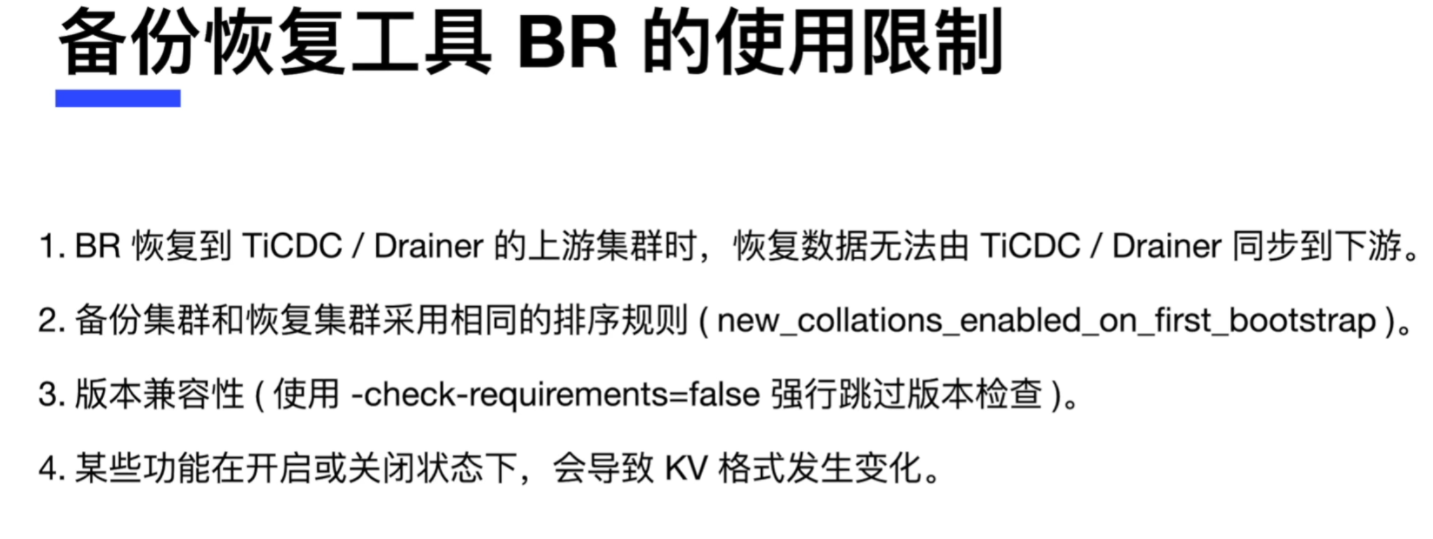
通过SQL语句backup和restore进行备份恢复,如果要查看恢复的进度,可以使用show backups|restores
TiDB支持使用BR命令行工具进行备份恢复。

[root@tidb01 ~]# wget https://download.pingcap.org/tidb-toolkit-v5.0.1-linux-amd64.tar.gz

BR工具最佳实践
1.推荐在业务低峰时势行备份操作。
2.恢复期间对在线业务影响很大,建议低峰或者(rate-limit)执行恢复。
3.BR备份与恢复最好串行,否则region会起冲突。
4.推荐在-s指定的备份路径上挂载一个共享存储。
5.在使用共享存储时,推荐使用高吞吐的存储硬件。
br backup full \
  --pd "${PDServer-IP}:2379" \        ##PD Server的IP地址与端口
  --storeage "local://tmp/backup" \   ##备份的位置
  --ratelimit 120 \                    ##每秒120M
  --log-file backupfull.log           ##日志位置
br restore full \
  --pd "${PDServer-IP}:2379" \        ##PD Server的IP地址与端口
  --storeage "local://tmp/backup" \   ##恢复的位置(全库的备份文件)
  --ratelimit 120 \                    ##每秒120M
  --log-file backupfull.log           ##日志位置
br restore full \
  --pd "${PDServer-IP}:2379" \        ##PD Server的IP地址与端口
  --filter 'db*.tbl*' \               ##恢复db*schema下的tbl*开头的所有表
  --storeage "local://tmp/backup" \   ##恢复的位置(全库的备份文件)
  --log-file backupfull.log           ##日志位置
-----------------备份test schema----------------
br backup db \
  --pd "${PDServer-IP}:2379" \        ##PD Server的IP地址与端口
  --db test \                         ##备份test数据库schema
  --storeage "local://tmp/backup" \   ##备份的位置
  --ratelimit 120 \                    ##每秒120M
  --log-file backupfull.log           ##日志位置

-----------------还原test schema----------------
br restore db \
  --pd "${PDServer-IP}":2379 \        ##PD Server的IP地址与端口
  --db test \                         ##指定schema的名称
  --storeage "local://tmp/backup" \   ##备份的位置
  --log-file backupfull.log           ##日志位置
-----------------备份test schema中的student表----------------
br backup table \
  --pd "${PDServer-IP}":2379 \        ##PD Server的IP地址与端口
  --db test \                         ##指定备份表的位置在那个schema
  --table student \                   ##指定备份的数据表
  --storeage "local://tmp/backup" \   ##备份的位置
  --ratelimit 120 \                    ##每秒120M
  --log-file backupfull.log           ##日志位置

-----------------恢复test schema中的student表----------------
br restore table \
  --pd "${PDServer-IP}":2379 \        ##PD Server的IP地址与端口
  --db test \                         ##指定备份表的位置在那个schema
  --table student \                   ##指定备份的数据表
  --storeage "local://tmp/backup" \   ##备份的位置
  --log-file backupfull.log           ##日志位置
备份增量,只需要在备份的时候指定上一次备份的时间戳 --lastbackupts即可。
br backup full \
  --pd "${PD-IPADDRESS}:2379" \
  -s local:///home/tidb/backupdata/incr \
  --lastbackupts ${LAST_BACKUP_Timestamp}

##获取时间戳的命令
LAST_BACKUP_Timestamp='br validate decode --filed="end-version" -s local:///home/tidb/backupdate  |tail -n1';
注意:备份的软件安装在pd Server节点上,在本地节点也要创建同样的目录
备份全库与恢复指定库
[root@tidb01 ~]# wget https://download.pingcap.org/tidb-toolkit-v5.0.1-linux-amd64.tar.gz
[root@tidb01 ~]# tar -zxvf tidb-toolkit-v5.0.1-linux-amd64.tar.gz
[root@tidb01 ~]# tail -n 3 .bash_profile
export PATH
export PATH=/root/.tiup/bin:$PATH:/root/tidb-toolkit-v5.0.1-linux-amd64/bin
在所有TiKV节点上创建对应的目录
mkdir -p /tmp/backup;chmod 777 /tmp/backup;   ##目录必需为空目录。

br backup full  \
--pd  "172.16.20.31:2379" \
--storage "local:///tmp/backup" \
--ratelimit 120 \
--log-file backupfull.log

################注意需要把所有的备份汇总,再拷贝到每个TIKV节点的指定目录###########
br restore full  \
--pd  "172.16.20.31:2379" \
--filter 'test.*' \
--storage "local:///tmp/backup" \
--log-file backupfull01.log
备份指定库与恢复指定库
br backup db  \
--pd  "172.16.20.31:2379" \
--db test \
--storage "local:///tmp/test" \
--ratelimit 120 \
--log-file backuptest.log

br restore db  \
--pd  "172.16.20.31:2379" \
--db test \
--storage "local:///tmp/test" \
--log-file backuptest01.log
备份指定表与恢复指定表
br backup table  \
--pd  "172.16.20.31:2379" \
--db test \
--table dept \
--storage "local:///tmp/dept_tab" \
--ratelimit 120 \
--log-file backuptab.log

br restore table  \
--pd  "172.16.20.31:2379" \
--db test \
--table dept \
--storage "local:///tmp/dept_tab" \
--ratelimit 120 \
--log-file backuptab.log
1.支持导出多种数据形式,包括SQL/CSV.
2.逻辑导出。
3.支持全新的表过滤和数据过滤,筛选数据更加方便。
4.支持导出到Amazon S3云盘。
5.针对TiDB进行优化。
Tiup install dumpling   #安装命令
tidb-toolkit            #包里面集成dumpling工具包。
select、reload、lock tables、replication client #最小权限
dumpling -u root -P 4000 -h 127.0.0.1 \
--filetype sql \ ##导出的文件的类型SQL
--threads 32  \  ##并行32条,也可以缩写为-t
-o /tmp/test \   ##备份的目录位置。
-r 200000 \      ##每个文件导出最大行数。
-F 256Mib        ##指定单个文件的大小。

dumpling -u root -P 4000 -h 127.0.0.1 \
--filetype CSV \ ##导出的文件的类型csv
-o /tmp/test \   ##备份的目录位置。

###########数据筛选#########适合单张表##会自动排队系统表。
dumpling -u root -P 4000 -h 127.0.0.1 \
--filetype sql \      ##导出的文件的类型SQL
--threads 32  \       ##并行32条
-o /tmp/test \        ##备份的目录位置。
-F 256Mib             ##指定单个文件的大小。
--filter "emp.t1*" \  ##导出emp数据库下的t1表。
--where "id <100"     ##表id都小于100

#################
dumpling -u root -P 4000 -h 127.0.0.1 \
--filetype sql \   ##导出的文件的类型SQL
--threads 32  \    ##并行32条
-o /tmp/test \     ##备份的目录位置。
-F 256Mib          ##指定单个文件的大小。
--filter "emp.*"   ##emp数据下的所有表
使用-B或-T选项筛选数据
-B employees 导出employees数据库。
-T employees.WorkOrder 导出employees.WorkOrder数据表。
dumpling 通过--consistency <consistency level> 标示控制导出数据"一致保证"的方式。
   采用以下这几种级另
flush        ##会锁住所有的表,只能读取
snapshot    ##执行一个数据库的快照。
lock        ##锁住指定的表
none        ##一般不采用,它不执行任何的锁
auto        ##根据数据的类型来自动选择,如果是mysql/mariadb 则会使用flush
./dumpling --snapshot  45671234567
./dumpling --snapshot  "2022-07-02 20:10:10"
1. -t用于指定导出的线程数。
2. -r选项用于指定单个文件的最大记录数(或者说,数据库中的行数)
wget https://download.pingcap.org/tidb-toolkit-v5.0.1-linux-amd64.tar.gz

dumpling -uroot -P4000 -h 172.16.20.34  -p'i02!_31A4L6W=$Nfrv' \
--filetype sql \
--threads 2 \
-o /tmp/test1 \
-F 10Mib \
-T test.dept

[root@tidb01 /tmp/test1]# cat metadata ;     ##导出的信息
Started dump at: 2022-11-30 20:50:01
SHOW MASTER STATUS:
        Log: tidb-binlog
        Pos: 437731354709065734
        GTID:

Finished dump at: 2022-11-30 20:50:02
[root@tidb01 /tmp/test1]#
[root@tidb01 /tmp/test1]#
[root@tidb01 /tmp/test1]# cat test.dept-schema.sql      ##创建表
/*!40101 SET NAMES binary*/;
CREATE TABLE `dept` (
  `id` int(11) DEFAULT NULL,
  `dname` varchar(20) DEFAULT NULL
) ENGINE=InnoDB DEFAULT CHARSET=utf8mb4 COLLATE=utf8mb4_bin;
[root@tidb01 /tmp/test1]#
[root@tidb01 /tmp/test1]#
[root@tidb01 /tmp/test1]# cat test.dept.000000000.sql   ##插入行
/*!40101 SET NAMES binary*/;
INSERT INTO `dept` VALUES
(1,'dev'),
(2,'sales');
[root@tidb01 /tmp/test1]#
[root@tidb01 /tmp/test1]#
[root@tidb01 /tmp/test1]# cat  test-schema-create.sql    ##创建数据库
/*!40101 SET NAMES binary*/;
CREATE DATABASE `test` /*!40100 DEFAULT CHARACTER SET utf8mb4 */;
软件包安装
tiup install lightning   #命令安装
tidb-toolkit             #软件包
后端导入backend的三种方式,默认使用local-backend。
| 后端 | local-backend | importer-backend | TiDB-backend |
|---|---|---|---|
| 速度 | 500G/小时 | 400G/小时 | 50G/小时 |
| 资源使用率 | 高 | 高 | 低 |
| 占用网络带宽 | 高 | 中 | 低 |
| 导入时是否满足ACID | 否 | 否 | 是 |
| 目标表 | 必须为空 | 必须为空 | 可以不为空 |
| 额外组件 | 无 | tikv-importer | 无 |
| 支持TiDB 集群 版本 | >-v4.0.0 | 全部 | 全部 |
硬件需求
1.32—+逻辑核CPU
2.20GB+ 内存
3.SSD磁盘
4.使用万兆网卡,带宽1GB以上。
5.建议单独部署
需要的权限
| 权限 | 范围 |
|---|---|
| select | tables |
| insert | tables |
| update | tables |
| delete | tables |
| create | database,tables |
| drop | database,tables |
| alter | tables |
配置TiDB Lightning
[lightning]
#转换数据的并发数,默认为逻辑cpu数据,不需要配置。
#混合部署的情况下可以配置为逻辑cpu的75%大小。
#region-concurrency =   配置一个导入的并发数据
#日志
level = "info"
file = "tidb-lightning.log"
[tikv-importer]
#backed 设置为local模式
backend = "local"
#设置本地临时存储路径
sorted-kv-dir = "/mnt/ssd/sorted-kv-dir"
[mydumper]
# 源数据目录。
data-source-dir = "/backup"
[tidb]
#目标集群的信息.tidb-server 的监听地址,填一个即可。
host = "tidb-server-IP"
port = 4000
user = "root"
password = ""
#表架构信息在从TiDB的"状态端口"获取
status-port = 10080
# pd-server的地址,填一个即可
pd-addr = "pd-server-IP:2379"

##启动
#!/bin/bash
nohup ./tidb-lightning -config tidb-lightning.toml > nohup.out &
1.断点续传的启用与配置
   [checkpoint]
   #启用断点续传。
   #导入时,TiDB Lightning 会记录当前进度。
   #若TiDB lightning 或其它组件异常退出,在重启时可以避免重复导入已完成数据。
   enable=true
2.断点的存储
  #存储断点的方式
  #  - file : 存放在本地文件系统(要求v2.1.1或以上)
  #  - mysql: 存放在兼容mysql的数据库服务器
  driver = "file"
3.断点续传的控制
--checkpoint-error-destroy: 该命令会让失败的表从头开始整个导入过程。
--checkpoint-error-ignore:  该命令会清除出错状态,忽略之前的错误进行断续导入。传入all对所有表进行上述操作。
--checkpoint-error-remove: 无论是否有出错,把表的断点清除。
命令行导入 foo与bar开头数据下所有的表
/tidb-lightning -f "foo*.*" -f "bar*.*" -d /tmp/data --backend tidb

TOML配置文件的写法
[mydumper]
filter = ['foo*.*','bar*.*']
第一步:启动服务
命令行参数 --server-mode
./tidb-lightning --server-mode --status-addr :8289
配置文件
[lightning]
server-mode = true
status-addr = ':8289'
第二步:提交任务
第三步:查看导入进度
第四步:管理任务
[lightning]
#转换数据的并发数,默认为逻辑cpu数据,不需要配置。
#混合部署的情况下可以配置为逻辑cpu的75%大小。
#region-concurrency =   配置一个导入的并发数据
#日志
level = "info"
file = "tidb-lightning.log"
[tikv-importer]
#backed 设置为local模式
backend = "local"
#设置本地临时存储路径
sorted-kv-dir = "/tmp"

[mydumper]
# 源数据目录。
data-source-dir = "/tmp/test1"

[tidb]
#目标集群的信息.tidb-server 的监听地址,填一个即可。
host = "172.16.20.34"
port = 4000
user = "root"
password = "i02!_31A4L6W=$Nfrv"
#表架构信息在从TiDB的"状态端口"获取
#status-port = 10080
# pd-server的地址,填一个即可
pd-addr = "172.16.20.31:2379"

######################做之前删除对应的表################
#!/bin/bash
nohup tidb-lightning -config /root/tidb-lightning.toml > nohup.out &
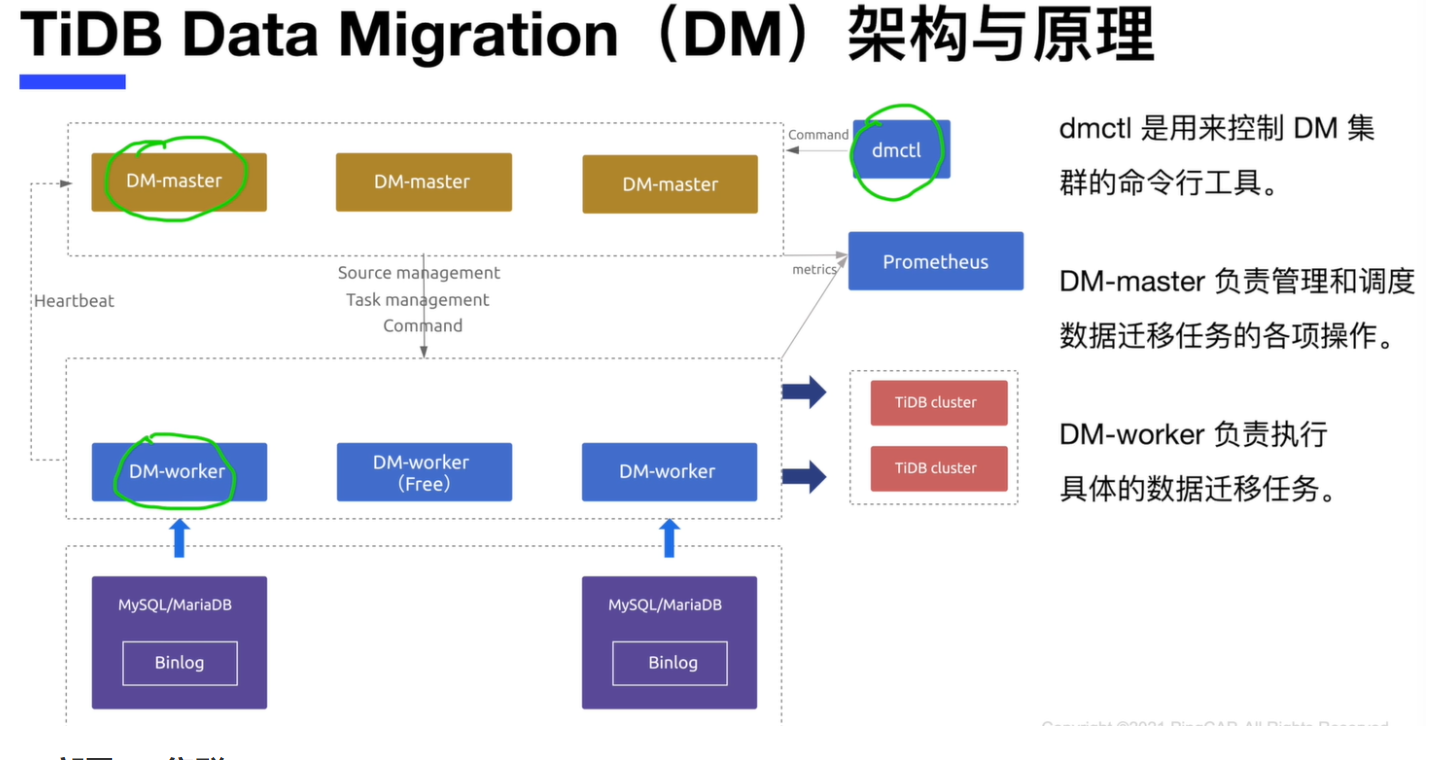
生成dm集群的模板文件
tiup dm template > topology.yaml
部署命令
[root@tidb01 ~]# tiup list dm-master  #查看最新的dm master版本
tiup dm deploy ${name}  ${version} ./topology.yaml --user root [-p] [-i .ssh/id_dsa ]
查看dm集群 与启动dm集群
tiup dm list
tiup dm display ${name}
tuup dm start  ${name}
1.MYSQL-->2.Table Block&Allow Lists-->3.Binlog Event filter-->4.table routeing-->5.TiDB
################
1.在Mysql源数据库上打开binlog
2.配置那些表在binlog中过滤
3.配置传输表的过滤条件
4.表的分片路由到一张表,或多张表
5.导入到TiDB中
DM的配置-源数据库配置
##########################用下面命令把数据源载入到DM系统###########
tiup dmctl --master-addr ${PD-ipaddress}  operate-source create source1.yaml

#########################配置DM#################################
source-id: "mysql-replica-01"
# 是否开启GTID
enable-gtid: false
# 是否打开 relay log
enable-relay: false
relay-binlog-name: '' #拉取源binlog的起始文件名
relay-binlog-gitd: '' #拉取源binlog的起始GTID

from:
 host: "mysql-IP-address"
 port: 3306
 user: "root"
 password: "password"

 #####################配置DM的任务#################
 #任务名,多个同时运行的任务不能重名
 name: "test"
 # 全量+增量(all)迁移模式。
 task-mode: 'all'
 # 下游TiDB配置信息
 target-database:
   host: "IP-address"
   port: 4000
   user "root"
   password: ""
## 规则配置
mysql-instances:                                ##源头的一个实例
 - source-id: "mysql-replica-01"                #从source-id=mysql-replica-01数据源迁移数据
   block-allow-list: "bw-rule-1"                #黑白名单配置名称
   filter-rules: ["filter-rule-1"]              #过滤数据源特定操作规则,可以配置多个过滤规则。
   route-rules: ["route-rule-1","route-rule-2"] #数据源表迁移到TiDB表路由规则,可以定义多个规则
 - source-id: "mysql-replica-02"                #从source-id=mysql-replica-02数据源迁移数据。
   block-allow-list: "bw-rule-2"                #黑白名单配置名称
   filter-rules: ["filter-rule-2"]              #过滤数据源特定操作规则,可以配置多个过滤规则。
--------------------------------------------
block-allow-list:    #针那些表那些库是要在binlog过滤的。
filter-rules:        #针对操作的操作规则的过滤。
route-rules:         #如果没有定义那源与目标库的库与表的名称都是一样的。
----------------------------------------------
block-allow-list:         # 定义数据源迁移表的过滤规则,可以定义多个规则。如果MD版本早于v2.0.0-bea.2则用block-white-list:
 bw-rule-1:               # 规则名称
   do-dbs: ["user"]       # 迁移哪些库
   ignore-dbs: ["user"]   # 忽略哪些库
   do-tables:             # 迁移user库下的t1表
   - db-name: "user"      ## 声名使用user库后面一定跟下一级。
     tbl-name: "t1"       ## 迁移user库下的t1表
--------------------------------------------------
filters:                     # 上游数据库实例匹配的表的binlog event
  filter-rule-1:             # 配置名称
    schema-pattern: "test"   # 源库名匹配规则,支持通配符 "*" 和"?"
    table-pattenrn: "sbtest" # 源表名匹配规则,支持通配符 "*" 和"?"
    events: ["insert"]       # 匹配那些event类型
    action: Ignore           # 对于符合匹配规则的binlog迁移(Do)还是忽略(Ignore)
  filter-rule-2:             # 配置名称
    schema-pattern: "test"
    events: ["truncate table"]# 匹配那些event类型
    action: Ignore
-------------------------
routes:                     # 上游和下游表之间的路由table routing规则集
  route-rule-1:             # 配置名称
    schema-pattern: "test"  # 源库名匹配规则,支持通符 "*"和"?"
    schema-schema: "sbtest" # 源表名匹配规则,支持通符 "*"和"?"
    target-pattern: "test"  # 目标表名匹配规则,支持通符 "*"和"?"
    target-schema: "sbtest" # 目标表名匹配规则,支持通符 "*"和"?"
假设源数据库中,sales库中有三个表:order_bejing,order_shanghai和order_guangzhou.目前希望迁移到目标库的sales库中的order表中,我们可以通过任务配置文件的过滤配置Table routeings来配置,如下
routes:                     # 上游和下游表之间的路由table routing规则集
  sale-route-rule-1:
    schema-pattern: "sales"  # 源库名匹配规则,支持通符 "*"和"?"
    schema-schema: "order*"  # 源表名匹配规则,支持通符 "*"和"?"
    target-pattern: "sales"  # 目标库名匹配规则,支持通符 "*"和"?"
    target-schema: "order"   # 目标库的sales库的order表
检查与启动任务
1.#启动任务
tiup dmctl --master-addr 172.16.10.71:8261 start-task | check-task ./task.yaml
----------------------------------------------------------------
{
   "result": true,
   "msg": "",
   "workers":[
       {
                "result": true,
                "worker": "172.16.10.72:8262",
                "msg": ""
       },
       {
                "result": true,
                "worker": "172.16.10.72:8262",
                "msg": ""
       }
   ]
}

2.#停止任务
tiup dmctl --master-addr 172.16.10.71:8261 pause-task  test
3.#恢复任务
tiup dmctl --master-addr 172.16.10.71:8261 resume-task test
4.#查看任务
tiup dmctl --master-addr 172.16.10.71:8261 query-task test
-------------------------------------------------------------------
{
   "result": true,      # 查询是否成功
   "msg": "",           # 失败原因描述
   "tasks":[            # 迁移 task 列表
       {
                "taskName": "test",       # 任务名称
                "taskStatus": "Running",  # 任务运行状态
                "sources": [              # 该任务上游 mysql 列表
                       "mysql-replica-01",
                        "mysql-replica-02"
                ]
       },
       {
                "taskName": "test2",      # 任务名称
                "taskStatus": "Running",  # 任务运行状态
                "sources": [              # 该任务上游 mysql 列表
                       "mysql-replica-01",
                        "mysql-replica-02"
                ]
       }
   ]
}
5.#停止任务
tiup dmctl --master-addr 172.16.10.71:8261 stop-task test
全量导出
  rows                # 行数
  chunk-filesize      # 打数据表分成多个文件default 64M
  threads             # 线程数default 4
全量导入
  pool-size           # 并发导入的线程数default 16
增量复制
  worker-count        # 线程数默认为16
  batch               # 并行事务默认是100
1.如何处理不兼容的DDL语句
tiup dmctl --master-addr 172.16.10.71:8261 handle-error test #跳过错误
2.自增主键冲突处理
当使用TiDB Data Migration 对分库分表进行合并迁移场景中,可能会出现自增主键冲突的情况,建议采用以下两种处理方式。
1.去掉自增的主键属性。
2.使用联合主键。
3.源数据库版本
1.源数据库版本
mysql 版本>5.5
mariaDb 版本>= 10.1.2
2.DDL 语法兼容性
  目前,TiDB部分兼容MYSQL 支持的DDL语句。
3. 分为分库
   如果业务分为分表之间存储数据冲突,自增主建冲突处理来解决:
4.同步的Mysql实例变更
curl --proto '=https' --tlsv1.2 -sSf https://tiup-mirrors.pingcap.com/install.sh |sh
source /root/.bash_profile
tiup list dm-master
tiup install dm
tiup update --self && tiup update dm
tiup dm template > topology.yaml
tiup dm deploy mytestdm  v5.0.0 ./topology.yaml --user root -p
tiup dm start mytestdm
[root@dm0 ~]# tiup dm list;
[root@dm0 ~]# tiup dm display mytestdm
[root@dm0 ~]# tiup dmctl --master-addr 172.16.20.40:8261        ##安装dmctl工具
演示环境数据
MariaDB [test11]> select * from test11.salas_hz;
+------+------+
| id   | name |
+------+------+
|    1 | z1   |
|    2 | z2   |
|    3 | z3   |
+------+------+
MariaDB [test11]> select * from test11.salas_sz;
+------+------+
| id   | name |
+------+------+
|    2 | y2   |
|    1 | y1   |
|    3 | y3   |
+------+------+
MariaDB [test11]> select * from test11.salas_sh;
+------+------+
| id   | name |
+------+------+
|    3 | c3   |
|    1 | c1   |
|    2 | c2   |
+------+------+
目标与源数据库创建登录用户
源数据库创建用户用于dm-worker连接
mysql -uroot
create user 'root'@'172.16.20.%' identified by 'Aa123456';
grant all privileges on *.* to 'root'@'172.16.20.%';
目标数据库创建用户用于dm-worker连接
[root@tidb01 /tmp/test1]# mysql -h172.16.20.34 -uroot -P 4000 -p'i02!_31A4L6W=$Nfrv'
create user 'root'@'172.16.20.%' identified by 'Aa123456';
grant all privileges on *.* to 'root'@'172.16.20.%';
创建数据源配置文件
创建一个加密的mysql登录密码
[root@dm0 ~]# tiup dmctl -encrypt 'Aa123456';
LVkaaYPyQZdxhtHL67pceEDQ3yixLpxnhg==
------------创建配置文件 -------------------
vim mysql-source-conf1.yaml
source-id: "mysql-replica-01"

from:
  host: "172.16.20.43"
  port: 3306
  user: "root"
  password: "LVkaaYPyQZdxhtHL67pceEDQ3yixLpxnhg=="
#------------------------------------------
 vim mysql-source-conf2.yaml
source-id: "mysql-replica-02"

from:
  host: "172.16.20.45"
  port: 3306
  user: "root"
  password: "LVkaaYPyQZdxhtHL67pceEDQ3yixLpxnhg=="
加载数据源
tiup dmctl --master-addr 172.16.20.41:8261 operate-source create ./mysql-source-conf1.yaml
tiup dmctl --master-addr=172.16.20.40:8261 operate-source create mysql-source-conf2.yaml
-------------------查询数据源的状态---------------------------
[root@dm0 ~]# tiup dmctl --master-addr 172.16.20.40:8261 get-config source mysql-replica-01

tiup dmctl --master-addr 172.16.20.40:8261 config source mysql-replica-01
-------------------查询数据源与dm-work的关系-------------------
tiup dmctl --master-addr=172.16.20.40:8261 operate-source show
配置任务文件
---
name: test                      # 任务名称,需要全局唯一
shard-mode: "pessimistic"       # 默认值为 "" 即无需协调。如果为分库分表合并任务,请设置为悲观协调模式 "pessimistic"。在深入了解乐观协调模式的原理和使用限制后,也可以设置为乐观协调模式 "optimistic"
task-mode: all                  # 任务模式,可设为 "full" - "只进行全量数据迁移"、"incremental" - "Binlog 实时同步"、"all" - "全量 + Binlog 迁移"
# timezone: "UTC"               # 指定数据迁移任务时 SQL Session 使用的时区。DM 默认使用目标库的全局时区配置进行数据迁移,并且自动确保同步数据的正确性。使用自定义时区依然可以确保整个流程的正确性,但一般不需要手动指定。

## ******** 数据源配置 **********
mysql-instances:
  - source-id: "mysql-replica-01"                   # 从 source-id = mysql-replica-01 的数据源迁移数据
    block-allow-list:  "bw-rule-1"                  # 黑白名单配置名称,如果 DM 版本早于 v2.0.0-beta.2 则使用 black-white-list
    filter-rules: ["filter-rule-1"]                 # 过滤数据源特定操作的规则,可以配置多个过滤规则
    route-rules: ["route-rule-1", "route-rule-2"]   # 数据源表迁移到目标 TiDB 表的路由规则,可以定义多个规则
  - source-id: "mysql-replica-05"                   # 从 source-id = mysql-replica-02 的数据源迁移数据
    block-allow-list:  "bw-rule-2"                  # 黑白名单配置名称,如果 DM 版本早于 v2.0.0-beta.2 则使用 black-white-list
    filter-rules: ["filter-rule-2"]                 # 过滤数据源特定操作的规则,可以配置多个过滤规则
    route-rules: ["route-rule-2"]                   # 数据源表迁移到目标 TiDB 表的路由规则,可以定义多个规则

## ******** 目标 TiDB 配置 **********
target-database:       # 目标 TiDB 配置
  host: "127.0.0.1"
  port: 4000
  user: "root"
  password: ""         # 如果密码不为空,则推荐使用经过 dmctl 加密的密文

## ******** 功能配置 **********
block-allow-list:                      # 定义数据源迁移表的过滤规则,可以定义多个规则。如果 DM 版本早于 v2.0.0-beta.2 则使用 black-white-list
  bw-rule-1:                           # 规则名称
    do-dbs: ["test.*", "user"]         # 迁移哪些库,支持通配符 "*" 和 "?",do-dbs 和 ignore-dbs 只需要配置一个,如果两者同时配置只有 do-dbs 会生效
    # ignore-dbs: ["mysql", "account"] # 忽略哪些库,支持通配符 "*" 和 "?"
    do-tables:                         # 迁移哪些表,do-tables 和 ignore-tables 只需要配置一个,如果两者同时配置只有 do-tables 会生效
    - db-name: "test.*"
      tbl-name: "t.*"
    - db-name: "user"
      tbl-name: "information"
  bw-rule-2:                         # 规则名称
    ignore-tables:                   # 忽略哪些表
    - db-name: "user"
      tbl-name: "log"

filters:                                        # 定义过滤数据源特定操作的规则,可以定义多个规则
  filter-rule-1:                                # 规则名称
    schema-pattern: "test_*"                    # 匹配数据源的库名,支持通配符 "*" 和 "?"
    table-pattern: "t_*"                        # 匹配数据源的表名,支持通配符 "*" 和 "?"
    events: ["truncate table", "drop table"]    # 匹配上 schema-pattern 和 table-pattern 的库或者表的操作类型
    action: Ignore                              # 迁移(Do)还是忽略(Ignore)
  filter-rule-2:
    schema-pattern: "test"
    events: ["all dml"]
    action: Do

routes:                           # 定义数据源表迁移到目标 TiDB 表的路由规则,可以定义多个规则
  route-rule-1:                   # 规则名称
    schema-pattern: "test_*"      # 匹配数据源的库名,支持通配符 "*" 和 "?"
    table-pattern: "t_*"          # 匹配数据源的表名,支持通配符 "*" 和 "?"
    target-schema: "test"         # 目标 TiDB 库名
    target-table: "t"             # 目标 TiDB 表名
  route-rule-2:
    schema-pattern: "test_*"
    target-schema: "test"
查检task是否有语法与状态
tiup dmctl --master-addr=172.16.20.40:8261 check-task ./dm-task.yaml
tiup dmctl --master-addr=172.16.20.40:8261 start ./dm-task.yaml
tiup dmctl --master-addr=172.16.20.40:8261 query-status ./dm-task.yaml
tiup dmctl --master-addr=172.16.20.40:8261 resume-task ./dm-task.yaml
1.编辑一个扩容的文件
cat dm-scale.yaml
worker_servers:
  - host: 172.16.20.11
2.下面是扩容命令
tiup dm scale-out dm-test dm-scale.yaml -uroot -p
3.下面是缩容命令
tiup dm scale-in dm-test -N 172.16.20.34:8262
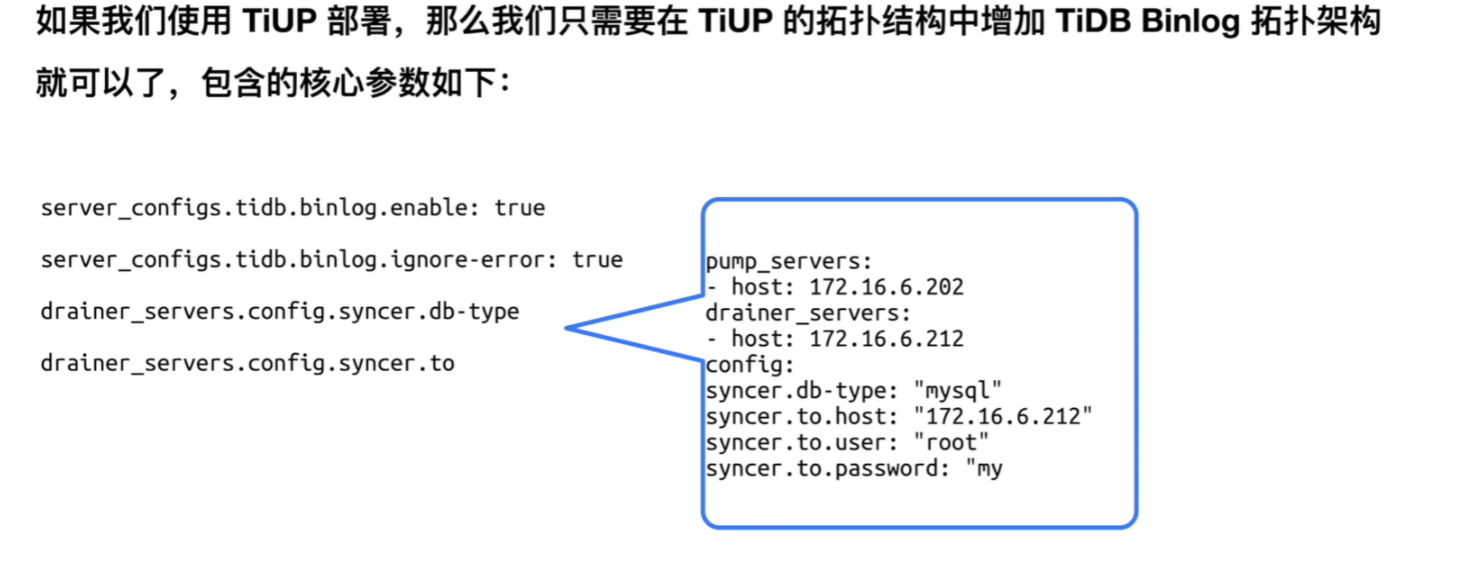
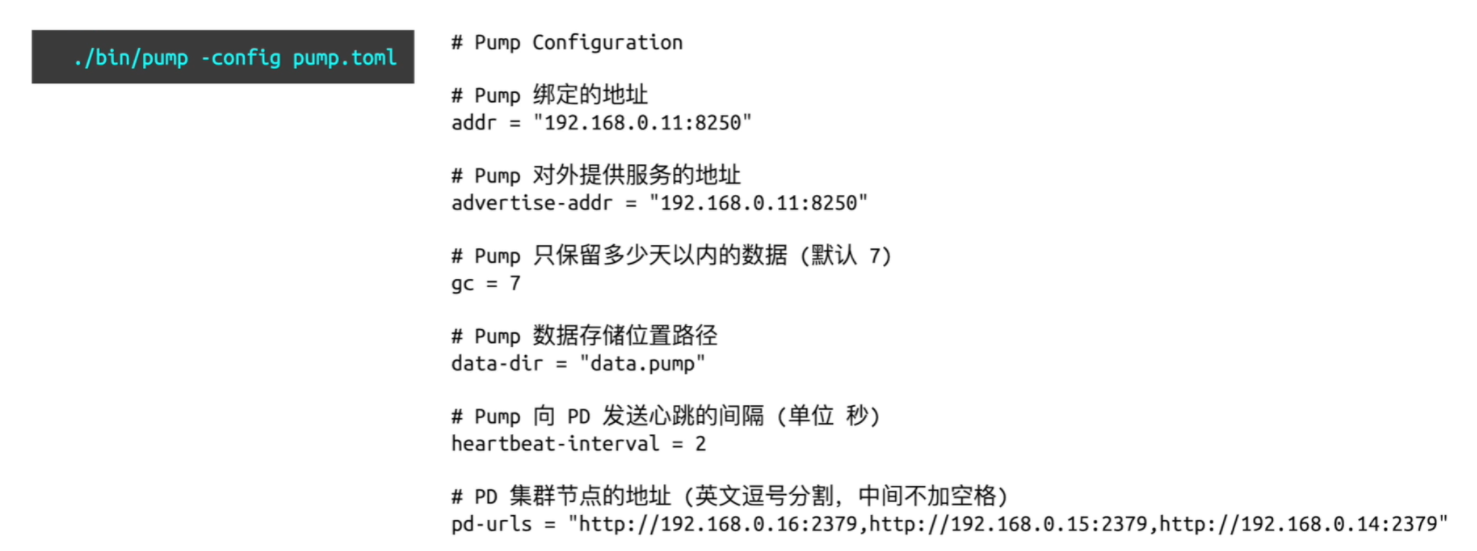
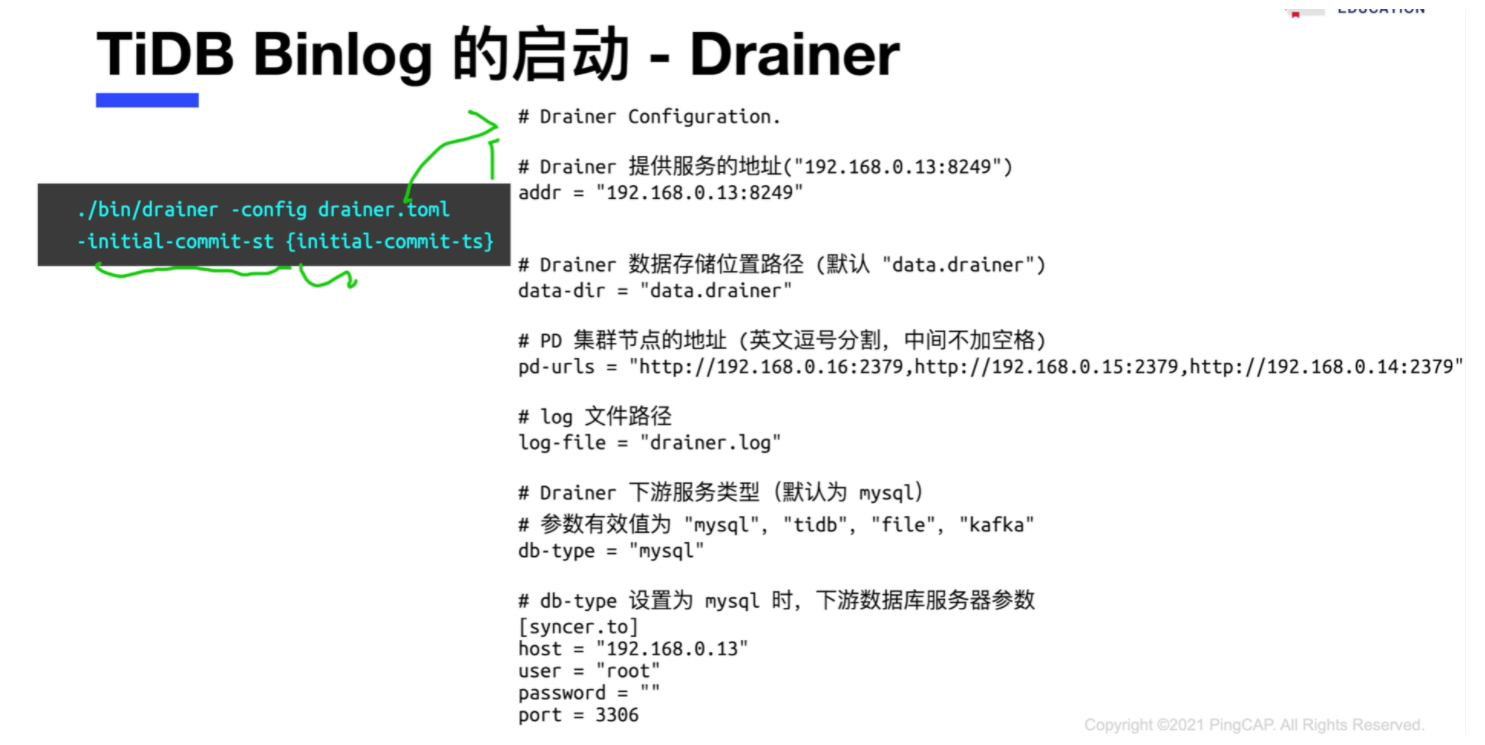
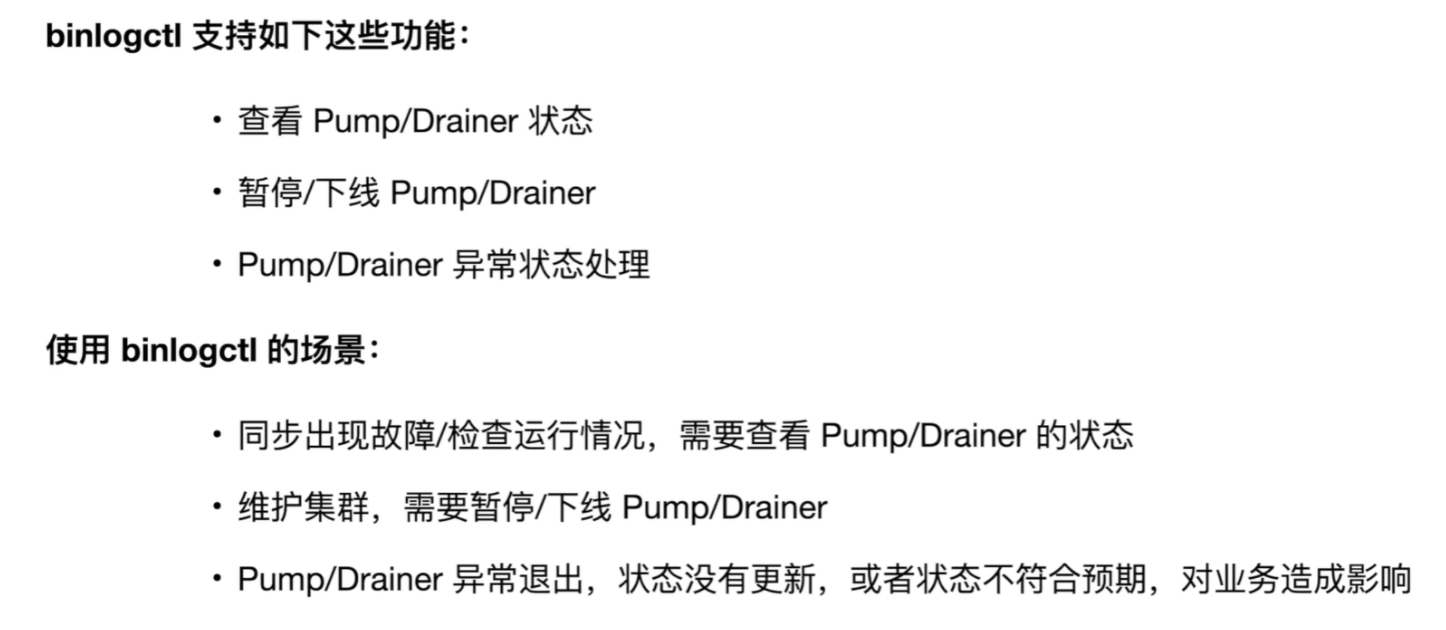
添加pump-server与drainer节点
1.打开TiDb的binlog日志
[root@tidb01 ~]# tiup cluster edit-config mytest
server_configs:
  tidb:
    binlog.enable: true
    binlog.ignore-error: true
[root@tidb01 ~]# tiup cluster reload mytest
2.编辑扩容节点
cat <<END>> ./scale-out-binlog.yaml
pump_servers:
  - host: 172.16.20.34
drainer_servers:
  - host: 172.16.20.35
    config:
      syncer.db-type: "mysql"
      syncer.to.host: "172.16.20.35"
      syncer.to.user: "root"
      syncer.to.password: "Aa123456"
      syncer.to.port: "3306"
END
3.执行扩容
tiup cluster scale-out mytest ./scale-out-binlog.yaml -uroot -p
在源TiDB 里创建数据
mysql -h172.16.20.34 -uroot -P 4000 -p'Aa123456';
use test;
create table t1 (id int,name varchar(20));
insert into t1 values(100,'zz');
insert into t1 values(200,'jj');
目标数据库创建用户
目标数据库创建用户
create user 'root'@'172.16.20.%' identified by 'Aa123456';
grant all privileges on '*.*' to 'root'@'172.16.20.%';
flush privileges;
wget  https://download.pingcap.org/tidb-v5.0.0-linux-amd64.tar.gz
binlogctl -pd-urls=http://172.16.20.31:2379 -cmd pumps      ##查看pumps状态
binlogctl -pd-urls=http://172.16.20.31:2379 -cmd drainer    ##查看drainer状态
##停止drainer服务
binlogctl -pd-urls=http://172.16.20.31:2379 -cmd pause-drainer -node-id 172.16.20.34:8249
##开启drainer服务
ssh root@drainer;
[root@tidb04 ~]# cd /tidb-deploy/drainer-8249/bin/
[root@tidb04 ~]# ./drainer -pd-urls=http://172.16.20.31:2379 -config ../conf/drainer.toml
1.打开TiDb的binlog日志
[root@tidb01 ~]# tiup cluster edit-config mytest
server_configs:
  tidb:
    binlog.enable: false
    binlog.ignore-error: false
[root@tidb01 ~]# tiup cluster reload mytest
2.移除pumps与drainer
tiup cluster scale-in mytest --node 172.16.20.34:8249  --force
tiup cluster scale-in mytest --node 172.16.20.32:8250
tiup cluster deploy <cluster-name> v5.0.0 ./topology.yaml
cat  ./topology.yaml
cdc_server:
  - host: 10.10.10.10
    gc-ttl: 86400
2.扩容一个CDC 节点
tiup cluster scale-out <cluster-name> scale-out.yaml
catcat  ./scale-out.yaml
cdc_server:
  - host: 10.10.10.10
    gc-ttl: 8300
    depoly_dir: "/tidb-deploy/cdc-8300"
    log_dir: "/tidb-deploy/cdc-8300/log"
1.创建一个TiCDC的任务
tiup cdc cli changefeed create
--pd=http://IP:port
--sink-uri="mysql:///root:Aa123456@127.0.0.1:3306/"
--changefeed-id="simple-relicateion-task"
-------------------------------
--changefeed-id: 同步任务的ID。
--sink-uri: 同步任务下游的地址,需要按照以下格式进行配置,目前支支持mysql/tidb/kafka/pulsar.
--start-ts: 指定changefeed的开始TSO。    #复制的起始时间
--target-ts: 指定changefeed的目标TSO。   #复制的截止时间
#下游mysql/tidb
1.worker-count: 向下游执行SQL的并发度(可选,默认值为16)
2.max-txn-row: 向下游执行SQL的Batch大小 (可选,默认值为256)
#下游Kafka
1.protocol:输出到kafka的消息协议,可选值有default、canal、avro、maxwell(默认为default)
2.max-message-bytes:每次向kafka broker发送消息的最大数据量(可选,默认64M)
cdc cli changefeed list --pd=http://IP:2379
cdc cli changefeed list --pd=http://IP:2379  --changefeed-id=simple-replication-task
cdc cli changefeed query --pd=http://IP:2379  --changefeed-id=simple-replication-task
1.停止同步任务
cdc cli changefeed pause --pd=http://IP:2379  --changefeed-id=simple-replication-task
2.启动同步任务
cdc cli changefeed resume --pd=http://IP:2379  --changefeed-id=simple-replication-task
3.删除同步任务
cdc cli changefeed resume --pd=http://IP:2379  --changefeed-id=simple-replication-task
14.6.更新TiCDC同步任务
1.停止服务
cdc cli changefeed pause -c test-cf --pd=http://IP:2379
2.更新服务
tiup cdc cli changefeed update test-cf \
--pd=http://IP:port \
--sink-uri="mysql:///root:Aa123456@127.0.0.1:3306/" \
--changefeed-id="simple-relicateion-task"
3.启动服务
cdc cli changefeed start -c test-cf --pd=http://IP:2379
1.TiCDC 只能同步至少存在一个有效索引的表,包括如下表可以正常同步
  *.主键(primary key)为有效索引。
  *.同时满足下列条件的唯一索引(unique index)为有效索引:
      .索引中每一列在表结构中明确定义非空(not nll)
      .索引中不存在虚拟生成的列(virtual gengeated cloumns).
2.TiCDC 不支持的场景有:
  *.暂不支持单独用RawKV 的TiKV集群 。
  *.不支持TiDB4.0中创建sequence的DDL操作和sequence函数。
  *.不支持TIKV Hibernate Region.
3.TiDB的兼容问题
  使用TiCDC v5.0.0-rc版本的cdc cli工具操作v4.0x集群导致不兼容问题。
tiup cluster scale-out <cluster-name> scale-out.yaml
catcat  ./scale-out.yaml
cdc_server:
  - host: 10.10.10.10
    gc-ttl: 8300
    depoly_dir: "/tidb-deploy/cdc-8300"
    log_dir: "/tidb-deploy/cdc-8300/log"

tiup ctl:v5.0.0 cdc capture list --pd=http://pd-addr:2379

3.迁移的目标mysql数据库添加时区
mysql_tzinfo_to_sql /usr/share/zoneinfo |mysql -u root -p mysql -S /data/3306/mysql.sock

4.创建一个任务
./cdc cli changefeed create \
--pd=http://IP:port \
--sink-uri="mysql://root:Aa123456@172.16.20.45:3306/"  \
--changefeed-id="relicateion-task0" \
--sort-engine="unified"
5.例举CDC的任务
cdc cli changefeed list --pd=http://IP:2379

6.查看某个任务
cdc cli changefeed list --pd=http://IP:2379  --changefeed-id=relicateion-task0
7.# 查看详细信息
cdc cli changefeed query --pd=http://IP:2379  --changefeed-id=simple-replication-task

8.停止relicateion-task0任务
cdc cli changefeed pause --pd=http://IP:2379  --changefeed-id=relicateion-task0
cdc cli changefeed remove --pd=http://IP:2379  --changefeed-id=relicateion-task0
9.删除cdc节点
tiup cluster scale-in tidb-test --node cdc-adrr:8300
 泡杯长岛冰茶
11768
泡杯长岛冰茶
8301
泡杯长岛冰茶
11768
泡杯长岛冰茶
8301
 云贝教育
5904
云贝教育
5904
 AskGuo
5798
AskGuo
5798
 1菩提行者1
5122
云贝教育
5078
1菩提行者1
5122
云贝教育
5078

 19941464235
 junle.chen@yunbee.net
 QQ群咨询:1080888483




点击加载更多